Koldan Cost Optimization Guide
The costs of cloud services can be high, in this guide we will learn how to reduce costs for the Koldan server installed in the cloud.
Product Architecture
Koldan has 3 main components, and the rest are services that Koldan depends on, such as a database and a file storage server.
Koldan Main Services
1. Web
- Viewing and managing users
- Viewing logs from users
- Model upload and control
- REST API
2. gRPC
- Communication between the end users and the server
- Real-time online transcription
- Saving user profiles
- gRPC (HTTP2) API
3. Engine(s)
- Performing the actual transcription
- Multiple engine instances with diffrent models
- Access is only possible via the gRPC API (depending on user permissions)
Dependencies
The application relies on several critical services:
| Service | Purpose |
|---|---|
| Keycloak | Authentication and authorization |
| PostgreSQL | Primary data base |
| Elasticsearch | Search and logging |
| Zookeeper | Service coordination and distributed configuration |
| S3 (minio) | Object Storage (mainly for models) |
Cost Optimization Strategies
1. External Services Configuration
By default, the Koldan installation installs a complete Koldan distribution including all its dependencies. However, if some of these services already exist in the organization and/or can be installed more cheaply through a managed cloud service, this can cut Koldan costs, reduce server resource requirements and reduce operational overhead.
External PostgreSQL
You can use an existing external PostgreSQL server, both for Koldan and Keycloak. We will do this by removing the PostgreSQL that is installed as part of the Koldan installation, and configuring Koldan and Keycloak to use the external server.
postgresql:
  install: false  # Disable internal PostgreSQL

config: |
  spring:
    datasource:
      url: "jdbc:postgresql://<hostname>:5432/koldan"
      username: "<username>"
      password: "<password>"

keycloak:
  externalDatabase:
    host: <hostname> # PostgreSQL server host
    user: <username>
    password: <password>
    database: koldan-keycloak
    port: 5432 # PostgreSQL server port
External Keycloak
If your organization already has a Keycloak server, it can be used as an external IdP.
keycloak:
  install: false  # Disable internal Keycloak

config: |
  koldan:
    keycloak:
      uri: "https://external-keycloak.my-org.com"
      externalUri: "https://external-keycloak.my-org.com"
      realm: "my-realm"
Important Note: External Keycloak Configuration When using an external Keycloak service, you must manually create and configure the required clients in your Keycloak instance. For detailed instructions on creating and configuring these clients, please refer to our Keycloak Configuration Guide.
External ElasticSearch
elasticsearch:
  install: false  # Disable internal Elasticsearch

config: |
  koldan:
    elastcsearch:
      host: "<url>"
      port: "<port>"
External S3 (MinIO)
If your organization already has an S3 server, you can use it to store Koldan files. To do this, you need to create a bucket in advance.
minio:
  install: false  # Disable internal MinIO

config: |
  koldan:
    s3:
      bucket: "koldan-storage"
      accesskey: "AWS-ACCESS-KEY"
      secretkey: "AWS-SECRET-KEY"
      endpoint: "https://s3.amazonaws.com"  # For AWS S3
External ZooKeeper
If your organization already has a ZooKeeper server, you can use it instead of setting up a dedicated ZooKeeper server for Koldan.
2. Horizontal Pod Autoscaling (HPA)
HPA can be used for automatic scaling of Koldan services, for example, you can reduce the number of transcription engines when they are not in use (for example at night) and add more when the system is overloaded during the day.
web:
  autoscaling:
    enabled: true
    minReplicas: 2
    maxReplicas: 10
    targetCPUUtilization: 80

grpc:
  autoscaling:
    enabled: true
    minReplicas: 2
    maxReplicas: 8
    targetCPUUtilization: 75

engineK2:
  instances:
  - id: "..."
  autoscaling:
    enabled: true
    minReplicas: 3
    maxReplicas: 12
    targetCPUUtilization: 70
3. Resource Tiers
For resource allocation, these are the recommended resource settings based on the expectations of the software users. It is recommended to start with these resources and calibrate them if necessary.
Small
Suitable for small organizations of between 5 and 10 users, testing environments, etc.
| Component | Memory Request | Memory Limit | CPU Request | CPU Limit |
|---|---|---|---|---|
| Web | 1Gi | 2Gi | 100m | 500m |
| gRPC | 1.5Gi | 2.5Gi | 500m | 1 |
| Engine | 2Gi | 4Gi | 1 | 4 |
Meduim
Suitable for medium-sized organizations of between 10 and 100 users, production environments.
| Component | Memory Request | Memory Limit | CPU Request | CPU Limit |
|---|---|---|---|---|
| Web | 1.5Gi | 4Gi | 1 | 2 |
| gRPC | 2Gi | 4Gi | 2 | 4 |
| Engine | 3Gi | 4Gi | 2 | 8 |
Large
Suitable for medium-sized organizations of over 100 users. It is recommended to consult Dixilang for the optimal settings.
| Component | Memory Request | Memory Limit | CPU Request | CPU Limit |
|---|---|---|---|---|
| Web | 5Gi | 5Gi | 4 | 4 |
| gRPC | 5Gi | 5Gi | 4 | 4 |
| Engine | 5Gi | 5Gi | 16 | 16 |
NOTE: These are starting points (Without considering HA) and should be adjusted based on your specific workload patterns and requirements.
4. Disk Sizes and Storage Usage
Depending on your deployment scale, we recommend adjusting storage allocations to optimize costs. Here's how you can right-size your storage based on your needs:
For exmaple:
elasticsearch:
  volumeClaimTemplate:
    resources:
      requests:
        storage: 2Gi  # Reduced from 8Gi

postgresql:
  primary:
    persistence:
      size: 2Gi  # Reduced from 8Gi

zookeeper:
  persistence:
    size: 1Gi  # Reduced from 8Gi

minio:
  persistence:
    size: 5Gi  # Reduced from 512Gi
It is recommended to check storage usage before performing this optimization and make sure we leave enough space for minimal additional growth.
5. Users Activity
Our licensing is team-sized based, depending on the number of users expected to use the application.
You can adjust your license tier at any time to match your actual usage needs.
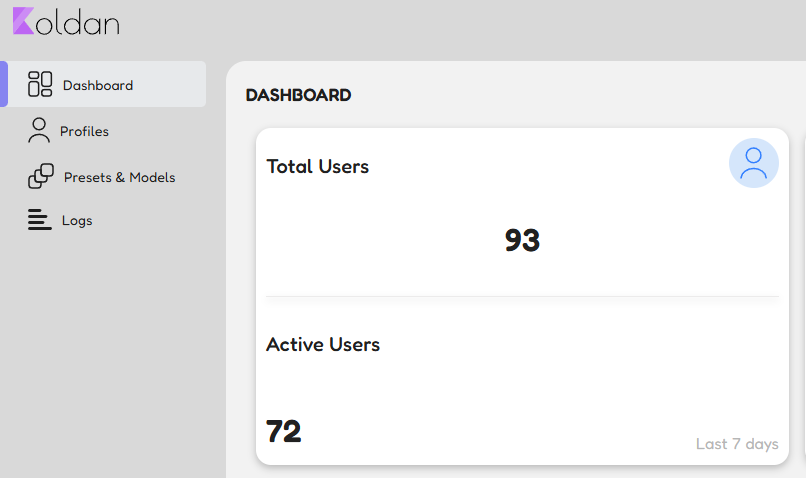
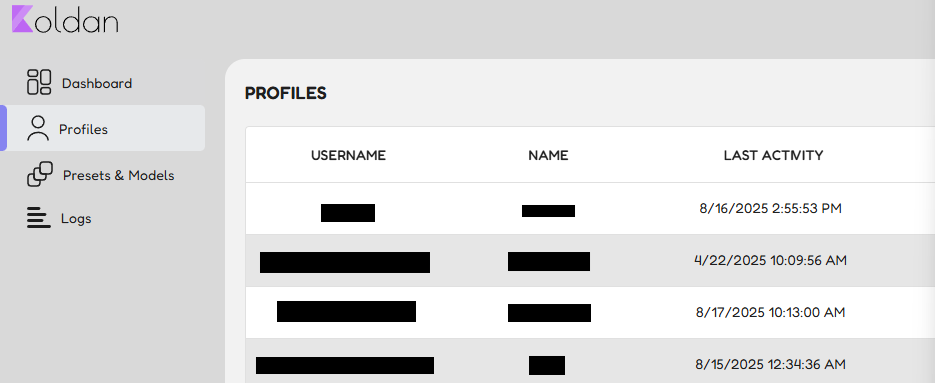
To help you make informed decisions, the dashboard provides:
-
Active Users (last 7 days): A quick snapshot of how many users are using the application.
-
Last Activity per User: Sort by Last Activity to identify inactive or rarely used accounts.
If you purchased a higher tier but notice many users are inactive, you may be able to downgrade to a smaller tier and reduce costs.
You may cosult our team regarding tailored lisence for your needs.
Best Practices
These are general guidelines for keeping costs low in Koldan and managing resources properly.
Monitoring
- Implement comprehensive monitoring
- Set up alerting for resource thresholds
- Regular performance reviews
Scaling Strategy
- Start with small tier
- Monitor usage patterns
- Scale based on actual metrics
Resource Management
- Regular resource utilization reviews
- Implement cost allocation tags
- Set up budget alerts
Implementation Checklist
- Choose appropriate resource tier
- Configure external services
- Set up HPA
- Configure monitoring
- Test in staging environment
- Deploy to production
- Monitor and adjust
We recommend consulting with us for any questions, especially for production environments where HA is important.